


























Elevate Your Interiors
with Trendy Tiles Display
Tiles That Speak the Language of Design.
13th Jun, 2026
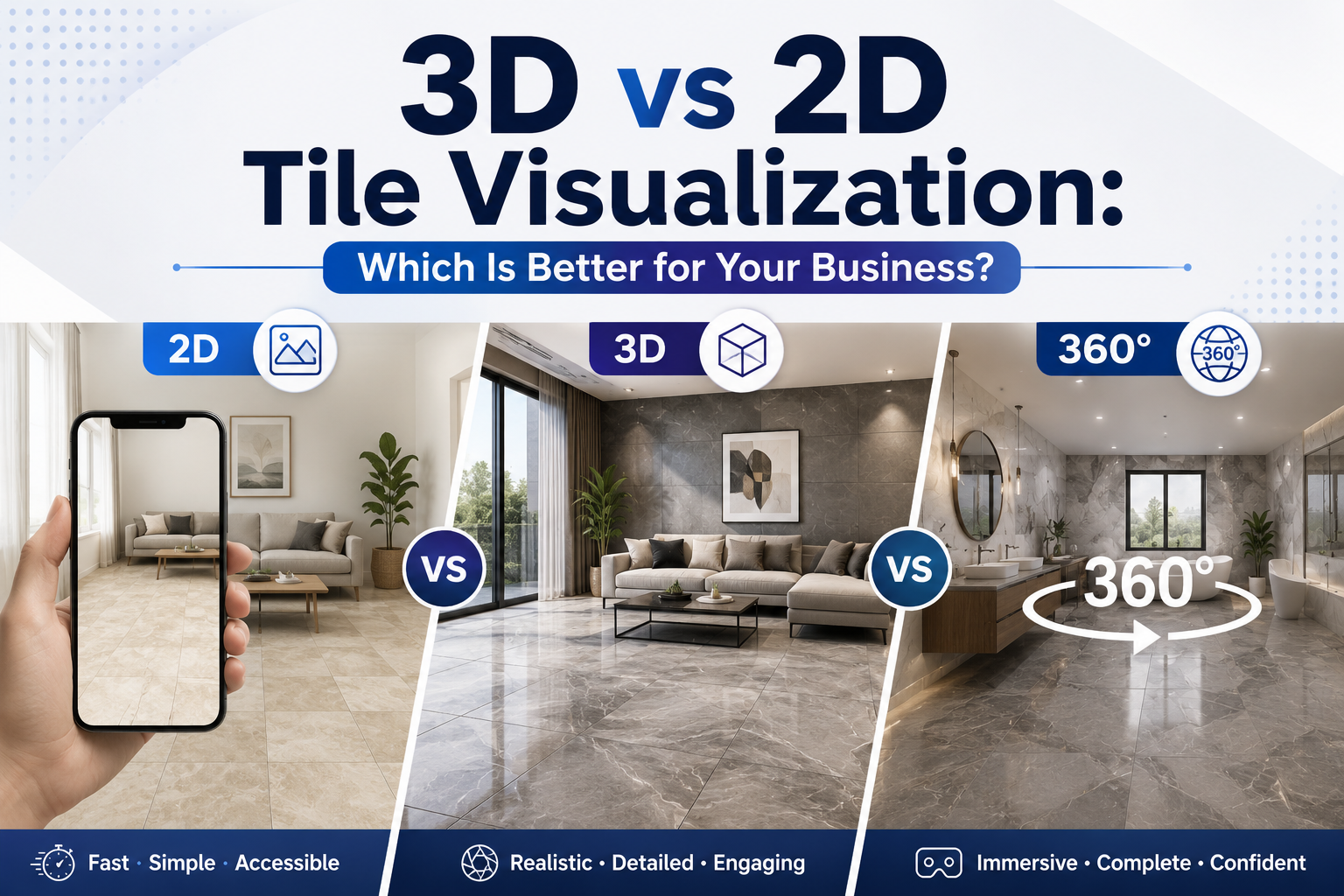
You know you need a tile visualizer. The question is which format, 2D tile visualizer, 3D tile visualizer, or 360-degree, will actually move the needle for your specific business. Pick the wrong format and you are either over-investing in technology your customers do not use, or under-investing in the visual selling technology that converts high-value buyers.
This guide gives you a clear, honest comparison of every tile visualization format, the business scenarios where each performs best, and how to decide which combination of tile visualization software will deliver the strongest return for your operation. By the end, you will know exactly which format fits your business, and why.
Not all tile visualization software is equal – and the differences go beyond aesthetics. The format you deploy determines the quality of your customer visualization tools, the realism of the digital tile preview, and ultimately how much confidence your buyers feel before making a purchase decision.
The right tile design visualizer for a manufacturer presenting to international trade buyers looks very different from the right tool for an online retailer showing customers a quick product page preview. Understanding the business context behind each format is the starting point for making the right decision.
Key Insight: The best tile visualization software is not the most sophisticated format, it is the format that matches your buyer's decision-making moment and removes their specific uncertainty.
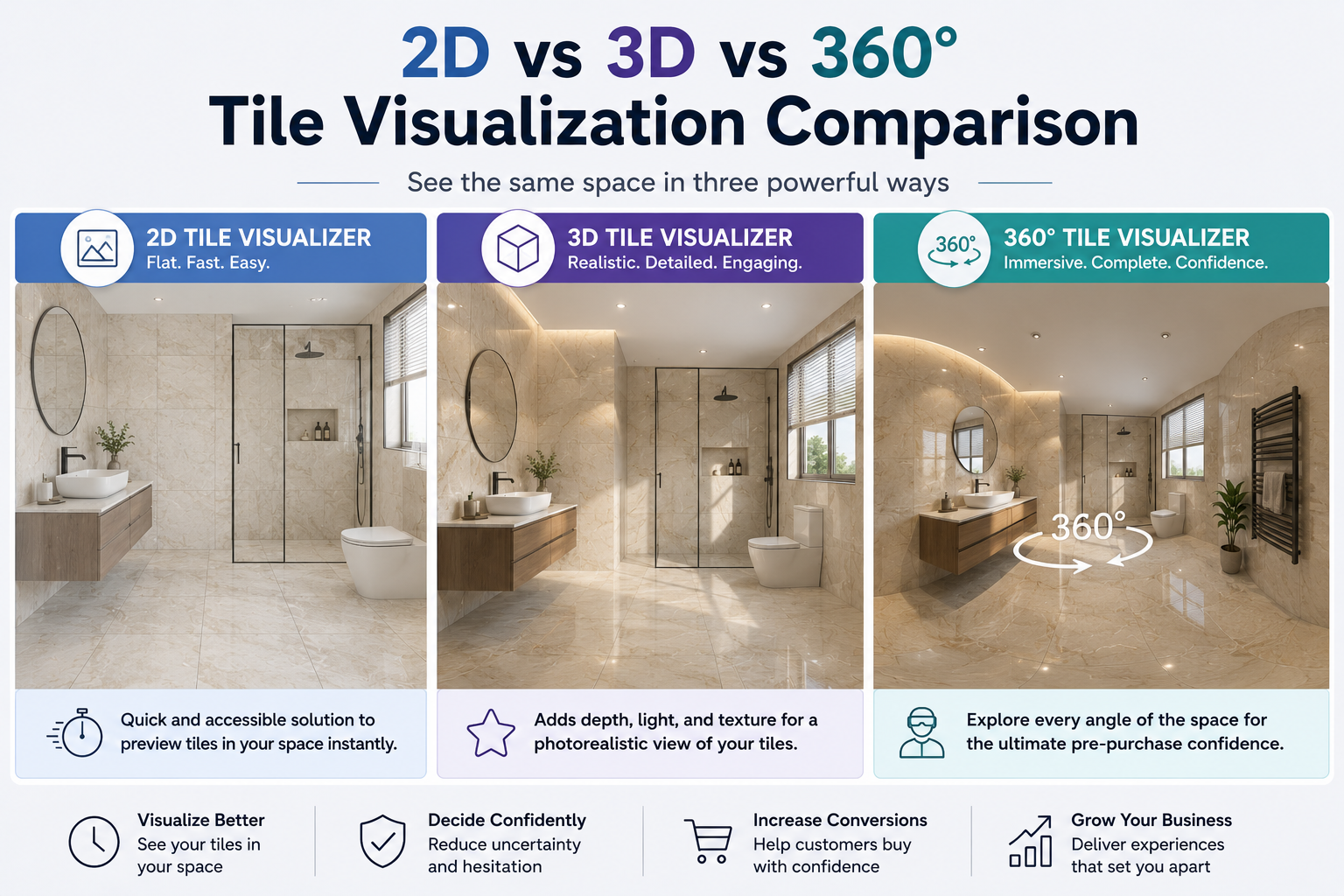
A 2D tile visualizer maps a tile image onto a flat photograph of a room. The user uploads a photo of their space or selects a preset room template, and the tile is digitally applied to the floor or wall surface. The result is a flat, straight-on digital tile preview showing how the tile design looks in a real room context.
2D tile visualization is the most widely deployed format in tile retail. It is fast, accessible, and highly effective for its primary purpose: helping customers quickly preview a tile in a room without complex rendering, high processing power, or extended load times.
A 3D tile visualizer renders tiles within a three-dimensional room environment using tile rendering software that adds depth, perspective, shadow, ambient lighting, and surface texture. Unlike 2D visualization, the room in a 3D room visualizer is a true three-dimensional space, walls have depth, floors recede into perspective, and the tile interacts with virtual light sources exactly as it would in a real installation.
The output of a 3D tile visualizer is a photorealistic digital tile preview that gives buyers a genuinely accurate sense of how a tile will transform a space, including the subtle ways that finish, format, and layout interact with room dimensions and natural light.
360-degree visualization creates a fully immersive panoramic room where users can look in every direction, up, down, sideways, and all around, within the virtual room design. It is the most advanced format in interactive room design, producing an experience that is qualitatively different from both 2D and standard 3D.
Where a 3D room visualizer shows a room from one angle, a 360-degree tile presentation software shows the complete space – ceiling, all four walls, floor, and the way they interact. For buyers making high-involvement decisions – full bathroom renovations, hotel lobby specifications, luxury residential projects – this immersive tile planning software experience creates a level of pre-purchase confidence that no other format can match.
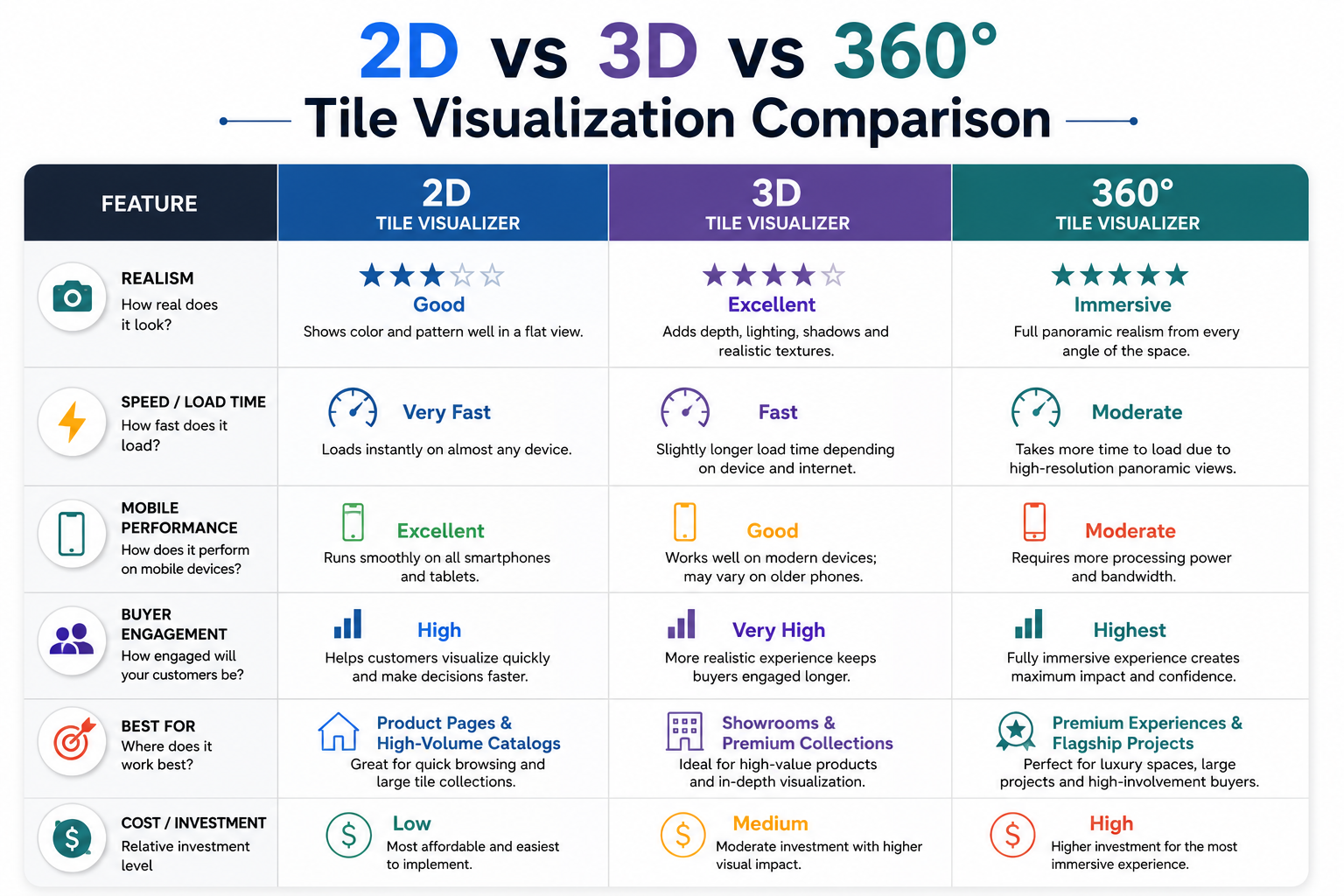
|
Feature |
2D Tile Visualizer |
3D Tile Visualizer |
360° Room Visualizer |
|
Realism |
Good |
Excellent |
Immersive |
|
Load speed |
Very fast |
Fast |
Moderate |
|
Mobile performance |
Excellent |
Good |
Moderate |
|
Texture rendering |
Basic |
Full |
Full |
|
Best use case |
Product pages |
Showrooms / Premium |
Kiosks / Trade shows |
|
Setup complexity |
Low |
Medium |
Medium-High |
|
Buyer engagement |
High |
Very high |
Highest |
|
Visual selling technology |
Good |
Advanced |
Premium |
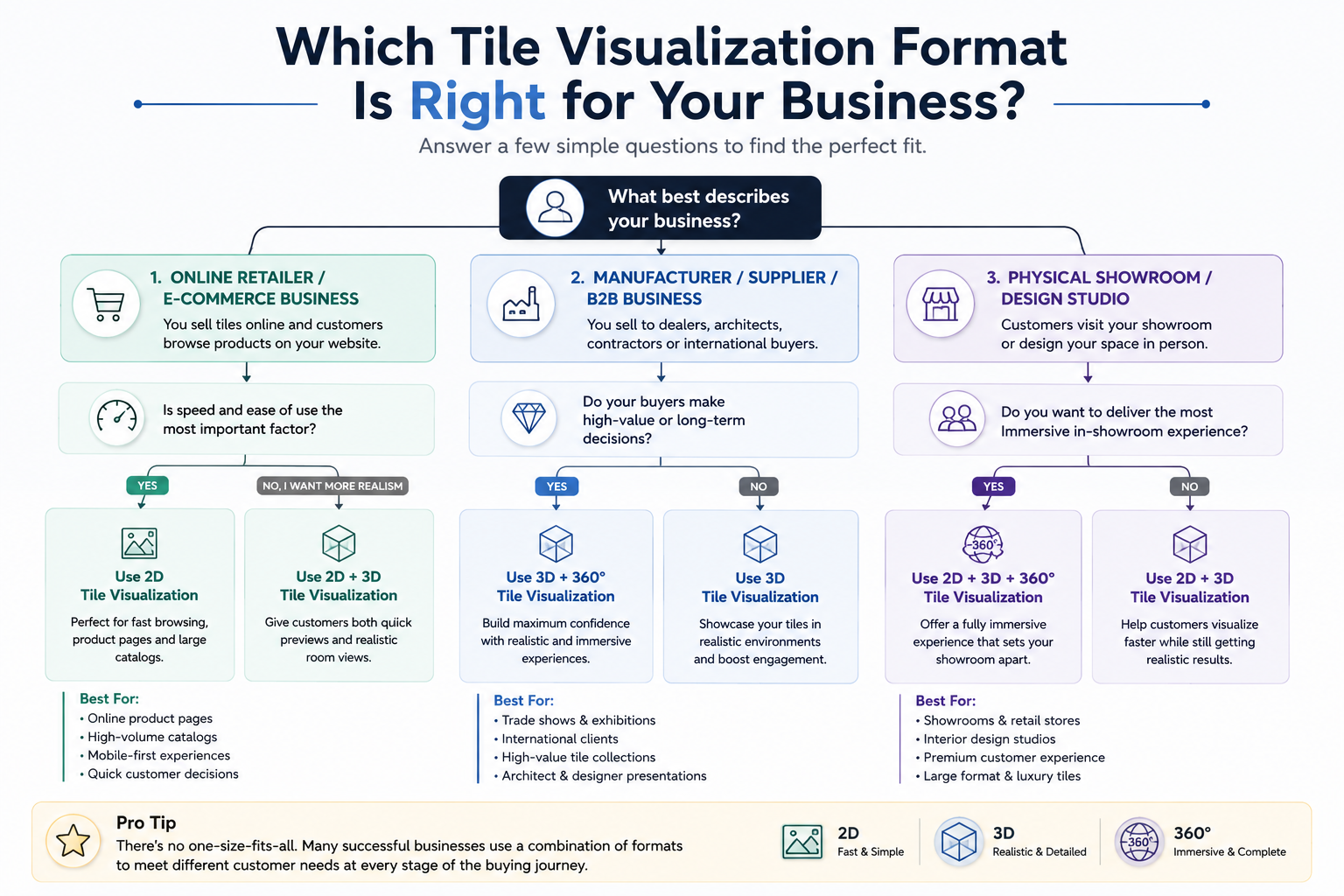
Start with a 2D tile visualizer as your product page tool. It delivers a fast, accessible digital tile preview that works for every customer on every device. Layer a 3D room visualizer for featured products, premium collections, or tiles where surface texture is a primary selling point. This combination covers the full spectrum of your browsing audience, from mobile shoppers making quick decisions to design-focused buyers investing significant time in product evaluation.
The tile design visualizer you choose must load fast enough on mobile to retain users who are browsing on 4G or slower connections. If your 3D room visualizer takes more than three seconds to render, mobile users abandon before they ever see the result. TilesDisplay's tile visualization software is optimized for mobile performance at all rendering levels.
Your buyers are making significant financial commitments, often six-figure orders for commercial or residential projects. For this audience, the most effective customer visualization tools combine a 3D tile visualizer for standard catalog presentations with 360-degree visualization for premium collections or high-profile project pitches.
The interior visualization software you use in trade presentations signals the quality of your brand before a single product is discussed. A manufacturer presenting tiles via a sophisticated 3D room visualizer communicates design leadership. One using static photography or a basic 2D tool communicates commodity positioning, regardless of product quality.
An in-store kiosk running 360-degree interactive room design visualization is the showroom format with the highest customer engagement rate. When a customer stands at a kiosk and can explore a fully immersed 360-degree room with your tiles applied to every surface, they are not looking at a product, they are experiencing a finished space. This is visual selling technology at its most powerful.
Deploy a 2D tile visualizer on your website for pre-visit research. Use a 3D room visualizer kiosk for in-store exploration. Use 360-degree tile presentation software for exhibition stands and high-value customer presentations. This three-format deployment is what TilesDisplay enables from a single platform, one catalog powering all three levels of interactive room design experience.
From an E-E-A-T perspective, Experience, Expertise, Authoritativeness, Trustworthiness, your choice of tile visualization software signals your brand's credibility to buyers as much as it serves a functional sales purpose. Businesses that deploy sophisticated virtual room design tools are demonstrating that they understand how their customers make decisions. This builds the kind of trust that shortens sales cycles and reduces price sensitivity.
The tile planning software you embed on your website is visible to every visitor. It either confirms that you are a modern, customer-centric business, or it suggests you are not. In a category where competitors increasingly offer some form of digital tile preview, not having a tile visualizer is itself a trust signal. The wrong kind.
TilesDisplay 360-degree room visualizer → tilesdisplay.in/360-visualizer
All visualization formats → tilesdisplay.in/wall-floor-visualizer
[External link: Think with Google, visual commerce and consumer confidence → thinkwithgoogle.com]
A 3D tile visualizer is tile visualization software that renders tile designs in a three-dimensional room environment, with depth, shadow, perspective, and realistic lighting. Unlike a 2D tile visualizer that maps tiles onto a flat photo, a 3D room visualizer creates a genuinely spatial preview using tile rendering software that simulates how the tile interacts with light and room geometry.
Not universally. A 3D tile visualizer delivers higher realism and is more effective for premium products, showroom presentations, and high-involvement purchases. A 2D tile visualizer delivers faster load times and wider device compatibility, making it more effective for mobile e-commerce and high-volume catalog browsing. Most businesses benefit from deploying both formats through a single tile visualization software platform.
Interior visualization software is a broader category of tools that allows users to preview interior design elements, tiles, flooring, paint colors, furniture, in virtual room environments. Tile visualization software is a specialized application of interior visualization software focused specifically on tiles, flooring, and wall surface materials.
Tile rendering software is the technology engine behind a 3D tile visualizer. It processes tile images, room geometry, and lighting data to produce photorealistic digital tile previews. Advanced tile rendering software handles surface texture, gloss levels, material depth, and light interaction to produce results that closely resemble real photography.
Visual selling technology refers to any digital tool that allows salespeople or self-service customers to see a product in context before purchase. In tile retail, visual selling technology includes tile visualizers, room design planners, customer visualization tools, and interactive tile catalogs, all designed to remove purchase uncertainty and accelerate decisions.
Yes. TilesDisplay tile visualization software is optimized for mobile performance across all formats, 2D, 3D, and 360-degree. The 2D tile visualizer delivers the fastest mobile experience. The 3D room visualizer works well on modern smartphones. The 360-degree interactive room design format performs optimally on high-specification devices or via desktop.
A room visualizer is the broader tool that shows how any material, tiles, flooring, paint, wallpaper, looks in a full room environment. A tile design visualizer is a room visualizer with a specific focus on tile products, typically with deeper catalog management, grout color testing, and tile layout options built in.
The choice between a 2D tile visualizer, a 3D room visualizer, and 360-degree visualization is not a question of which is best, it is a question of which combination fits your buyers' decision-making moments. E-commerce product pages need fast, accessible 2D digital tile previews. Premium showrooms need immersive 3D room visualizer and 360-degree interactive room design experiences. Trade presentations need tile presentation software that communicates brand authority before a product is discussed.
The best businesses deploy all three levels of tile visualization software from a single platform, serving every buyer, at every moment, with the right level of visual selling technology. That is exactly what TilesDisplay enables.
What format of tile visualization software are your competitors currently offering their customers, and how does your current digital tile preview experience compare?
Start your TilesDisplay free trial → tilesdisplay.in/signup
Excerpt: Choosing between a 3D tile visualizer, 2D tile visualizer, or 360-degree format is one of the most important decisions in your tile visualization software strategy. This guide compares every format across realism, mobile performance, buyer engagement, and business use case, so you can deploy the right visual selling technology for your specific customers.
