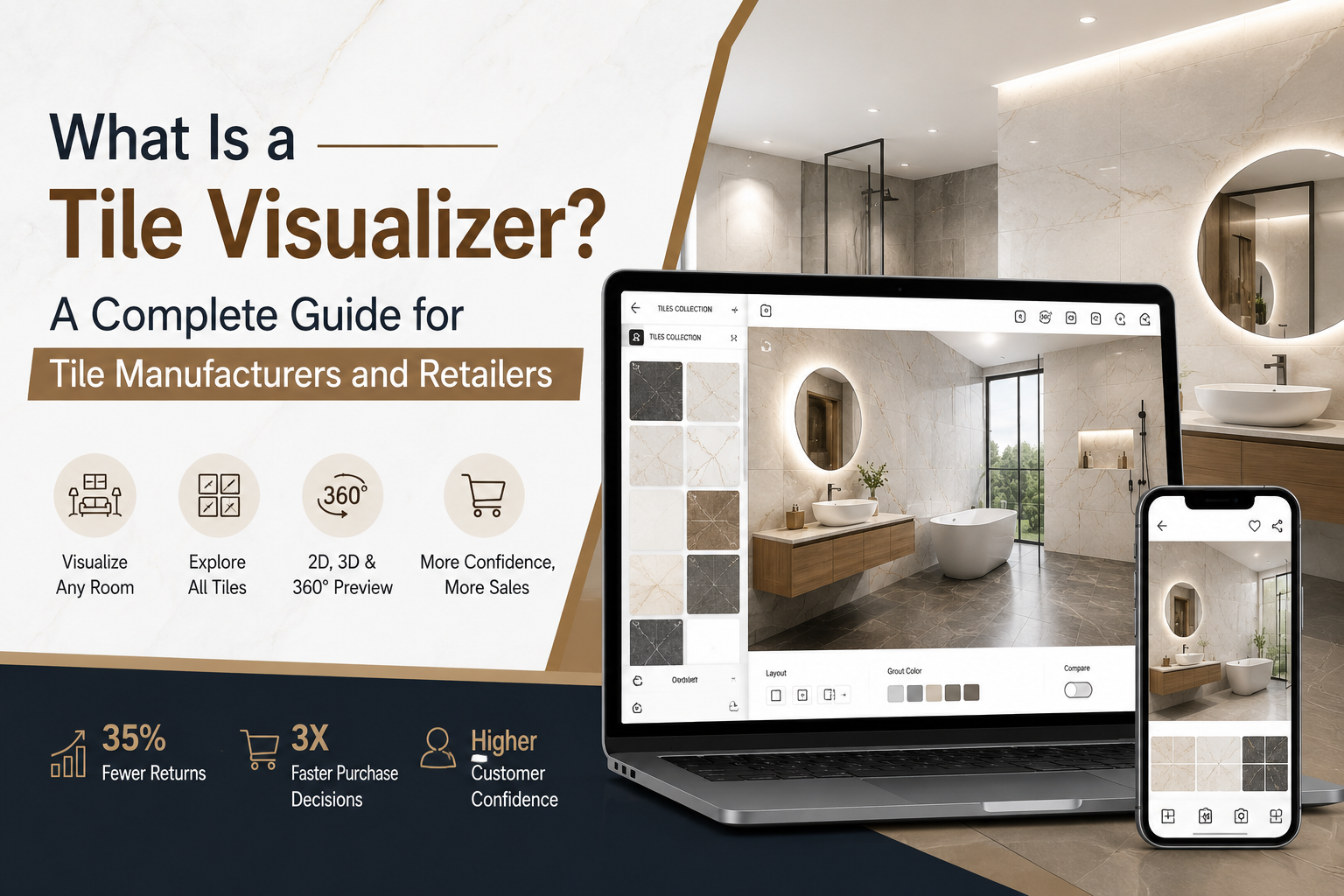
Imagine your customer picking up a 10×10 cm tile sample, staring at it, and still having no idea how it will look across their bathroom wall. That uncertainty is costing your business sales every single day.
A tile visualizer solves this problem in seconds. Whether you are a tile manufacturer, retailer, or distributor, understanding what a tile visualizer is and how to use one is one of the most important steps you can take to grow your business in 2026. This guide explains everything: what a tile visualizer is, how it works, the different types available, who benefits most, and what to look for when choosing a tile visualization platform.
What Is a Tile Visualizer?
A tile visualizer is a digital tool that lets users preview how tiles, flooring, and wall surfaces will look in a real room environment before a single tile is purchased or installed. Instead of asking customers to imagine the finished result from a small sample, a tile visualizer places the selected tile design digitally onto a photograph or 3D room model.
Modern tile visualizers are web-based and typically embedded directly into a manufacturer's or retailer's website. A customer selects a tile, uploads a photo of their room or chooses from preset templates, and sees an accurate, photorealistic result within seconds. No app downloads. No technical expertise required.
Key Takeaway: A tile visualizer bridges the gap between a product sample and a finished room, turning guesswork into a confident, visual decision.
How Does a Tile Visualizer Work?
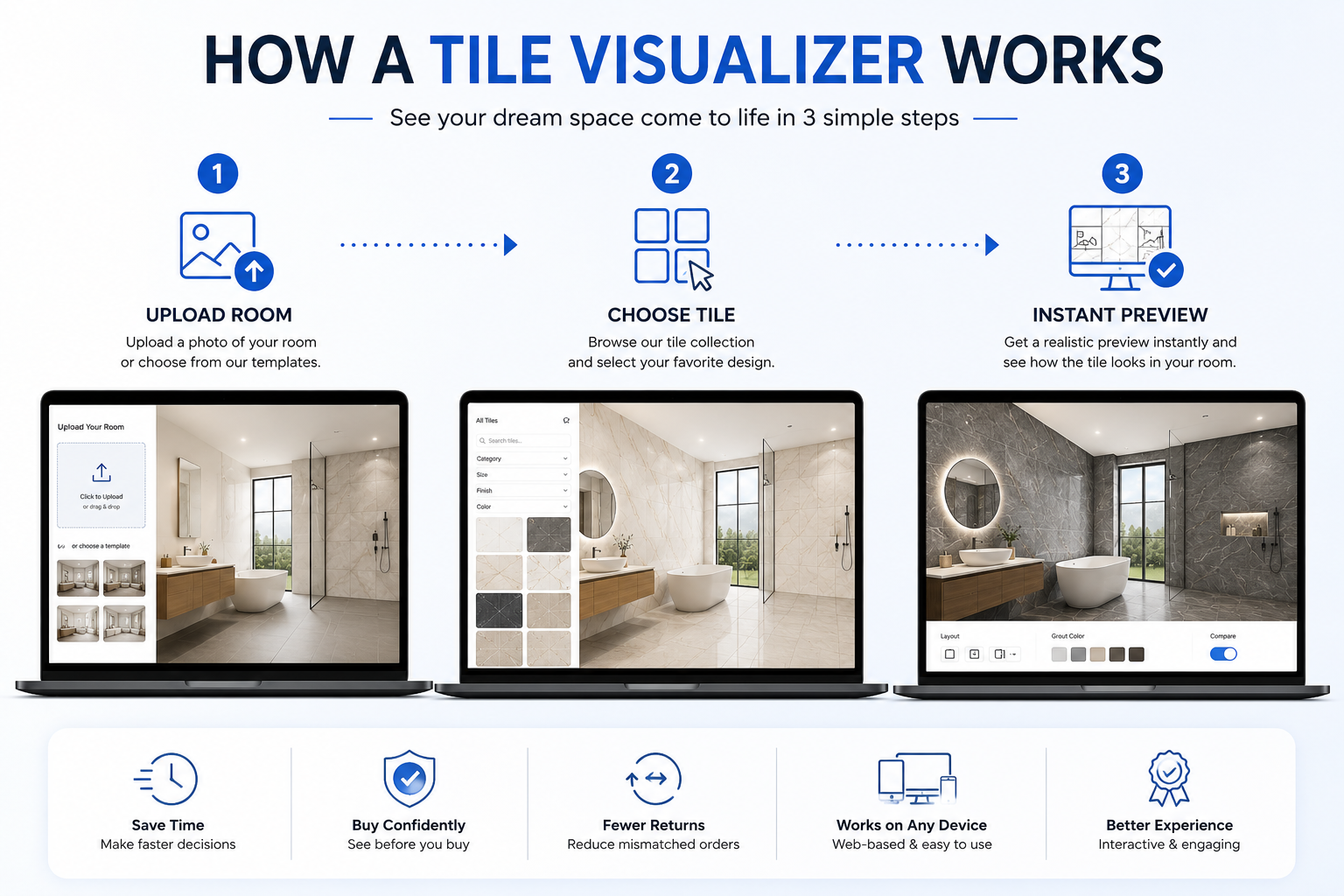
The process behind a tile visualizer combines image processing, surface-mapping technology, and a product catalog to produce realistic previews. Here is how it works step by step.
Step 1: Upload or select a room
The user either uploads a photo of their own room or selects from a library of pre-designed templates: bathroom, kitchen, bedroom, living room, hallway, or commercial space. This is the canvas the tile visualizer works with.
Step 2: Choose a tile from the catalog
The user browses the product catalog integrated into the online tile visualizer. This catalog is populated with the manufacturer's or retailer's own tile designs, including images, dimensions, finish types, and material data. On TilesDisplay, the catalog supports 17 different surface material types.
Step 3: See the real-time result
The tile design is digitally mapped onto the selected floor or wall surface using a tile preview tool that accounts for scale, perspective, lighting, and texture. The result is a photorealistic preview showing how the tile will actually look, not how you imagine it might look.
Users can switch materials, test grout colors, change tile layouts (horizontal, herringbone, chevron), and compare two options side by side all in the virtual room visualizer without leaving the page.
Types of Tile Visualizers
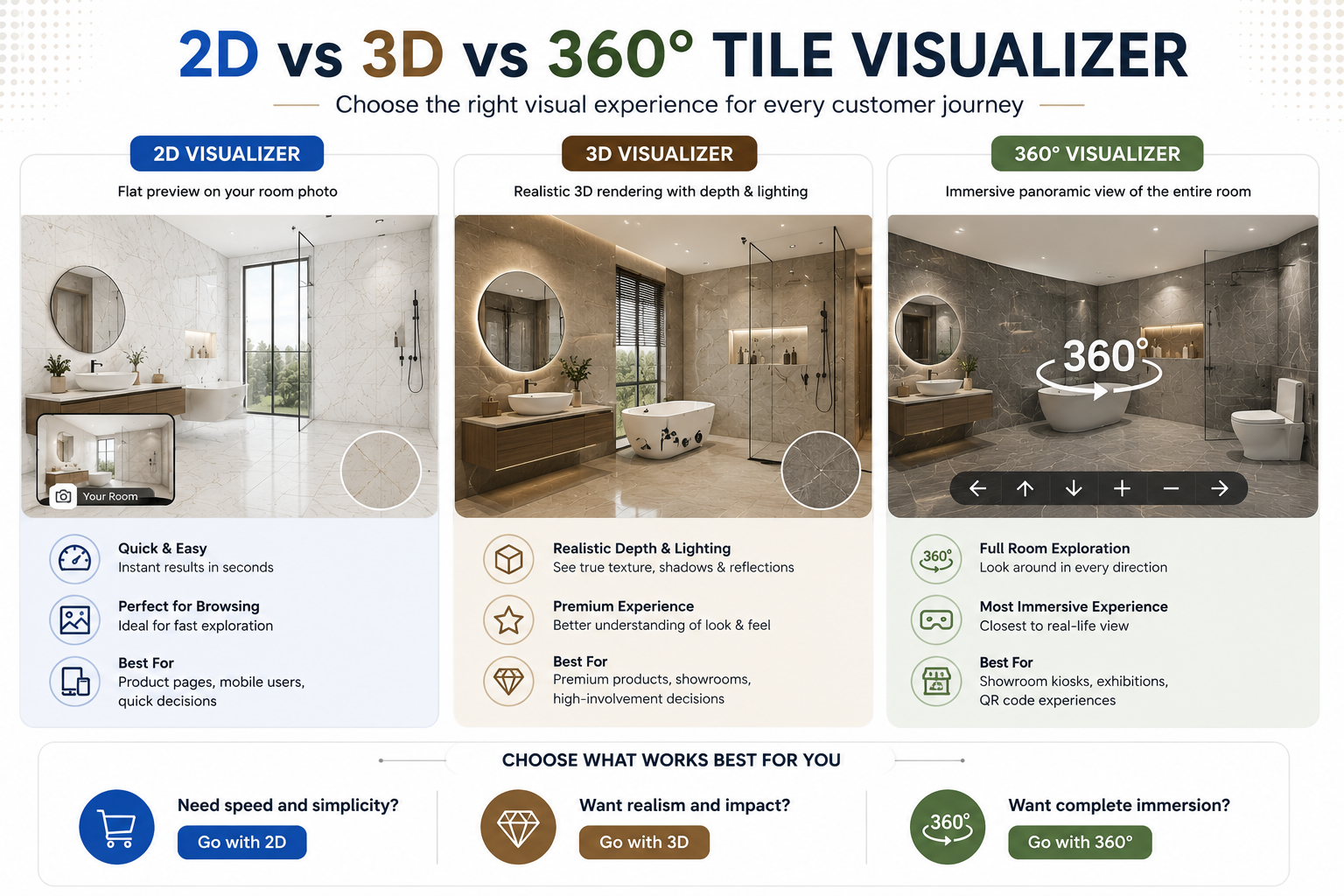
Not all tile visualization software is the same. Different formats serve different buyer moments and business needs. Here is a breakdown of the main types.
2D Wall and Floor Visualizer
The most widely used format in tile retail. The tile is mapped onto a flat photograph of a room, either uploaded by the user or selected from a template library. Fast, accessible, and highly effective for online product pages and quick browsing. Best for: e-commerce retailers, product listing pages, mobile users.
3D Tile Visualizer
A 3D tile visualizer renders the selected tile in a three-dimensional room environment with depth, shadows, and realistic lighting. It gives a far more accurate impression of how a tile changes the feel of a space, particularly for premium finishes, large-format tiles, or designs where texture is a key selling point.
Best for: premium tile brands, showroom presentations, high-involvement purchase decisions.
360-Degree Room Visualizer
A 360-degree room visualizer creates a fully immersive panoramic view of a tiled room. The user can look in every direction – up, down, left, and right – inside the virtual space. It delivers the most convincing digital preview of a completed room available today.
Best for: showroom kiosks, exhibition displays, QR code campaigns on physical tile samples.
AR Tile Visualizer (Augmented Reality)
An AI tile visualizer or AR variant overlays tile designs onto a live camera view of the user's actual room using a smartphone. No upload is needed; the user points their phone at a floor or wall and the tile appears in real time.
Best for: high-engagement consumer experiences, app-based shopping, large-format tiles.
Who Uses a Tile Visualizer?
Tile Manufacturers
Manufacturers integrate tile visualization software into their website so trade buyers, distributors, and end customers can explore the full collection in realistic room environments. This reduces the sampling cost, speeds up purchase decisions, and allows a global audience to evaluate designs without visiting a physical showroom. An interactive tile catalog powered by a visualizer can show hundreds of SKUs in multiple room types, something no physical display can match.
Tile Retailers and Showrooms
Offline retailers use tile showroom technology – typically an in-store kiosk with a wall and floor visualiser – to help customers explore options without handling every physical tile. Online tile retailers embed the tile design visualizer on product pages, converting browsers into buyers by letting them preview before purchase.
Distributors and Wholesalers
Distributors use tile visualization platforms to present collections to retail partners and trade buyers. Shared visualizer links and PDF catalog generation allow remote product presentations without costly sample logistics, an especially valuable capability for international trade.
Interior Designers and Architects
Designers use virtual room visualizers to present tile selections to clients in realistic room contexts. Client approvals become faster and more confident when the designer can show exactly how a tile will look installed, rather than asking the client to imagine it.
Key Business Benefits of a Tile Visualizer
• Reduces purchase hesitation: customers who can visualize the result are significantly more likely to commit
• Cuts product returns by up to 35%: decisions made with accurate previews lead to fewer mismatched orders
• Increases website engagement: average session duration rises sharply when a tile visualizer is embedded on product pages
• Accelerates the sales cycle: buyers move from discovery to purchase 3x faster when uncertainty is removed
• Reduces sampling costs: fewer physical samples need to be shipped when digital previews are available
• Differentiates your brand: businesses offering a tile visualization platform stand out from competitors relying on static images
What Makes a Great Tile Visualization Platform?
When evaluating tile visualizer software for your business, look for these essential capabilities:
• Material range: tiles, marble, granite, vinyl, SPC, WPC, wallpaper, paint, and other surfaces you sell
• Website integration: embeds directly on your product pages with a simple code snippet
• Catalog management: supports bulk product upload and auto-sync with your existing database
• 3D and 360-degree support: offers immersive formats for premium products and showrooms
• QR code generation: connects physical tile displays to live digital previews via smartphone scan
• PDF catalog creation: allows exportable room previews for sharing with partners, designers, and buyers
• B2B and B2C support: serves both trade buyers and end consumers from one platform
• Multilingual support: essential for manufacturers exporting to international markets
TilesDisplay: Tile Visualization Built for Manufacturers and Retailers
TilesDisplay is a tile visualization platform developed in Morbi, Gujarat – the tile capital of India, by the team at Antique Touch. It is purpose-built for tile manufacturers, distributors, retailers, and e-commerce brands.
The platform supports 17 surface materials, delivers 2D, 3D, and 360-degree visualization, and includes website integration, interactive kiosk deployment, QR code generation, PDF catalog creation, and a Virtual Sample feature that eliminates the need for physical samples entirely.
Image and Visual Suggestions
• Hero image: Screenshot of TilesDisplay room visualizer showing bathroom tiles applied in real room. Alt text: 'Tile visualizer showing marble wall tiles in a modern bathroom TilesDisplay'
• Infographic: How a tile visualizer works in 3 steps (upload room → select tile → preview result). Alt text: 'Step-by-step diagram of how a tile visualization software works'
• Comparison image: 2D vs 3D vs 360-degree tile visualization side-by-side. Alt text: '2D vs 3D vs 360 degree tile visualizer comparison for tile retailers'
• Screenshot: TilesDisplay catalog management dashboard. Alt text: 'Interactive tile catalog management in TilesDisplay visualization platform'
Frequently Asked Questions
What is a tile visualizer?
A tile visualizer is a digital tool that lets users preview how tiles will look in a real room before purchasing. Using a photograph or preset room template, the tool maps tile designs onto floors and walls in realistic scale and lighting.
What is the difference between a 2D and 3D tile visualizer?
A 2D tile visualizer maps the tile onto a flat photograph. A 3D tile visualizer renders the tile in a three-dimensional room with depth, shadow, and lighting for a more realistic result. Both are available in TilesDisplay.
Is a tile visualizer free to use?
Consumer-facing tile visualizers are often free. Business-grade tile visualization software with catalog management, website integration, and multi-format support is subscription-based. TilesDisplay offers a 14-day free trial.
Can I use an online tile visualizer with my own room photo?
Yes. TilesDisplay and most modern tile visualization platforms allow users to upload a photo of their own room. The tile is then mapped onto the floor or wall surfaces in the photo for a personalized preview.
How does an AI tile visualizer differ from a standard tile visualizer?
An AI tile visualizer uses artificial intelligence to automatically detect floor and wall surfaces in a photo, removing the need for manual surface selection. It produces faster, more accurate surface mapping, particularly for complex room photos with irregular angles.
Which businesses benefit most from tile visualization software?
Tile manufacturers, retailers, distributors, e-commerce brands, and interior designers all benefit significantly. Any business that sells tiles or flooring and wants to help customers make faster, more confident buying decisions will see measurable results from implementing a tile visualization platform.
Conclusion
A tile visualizer is no longer an optional feature; it is a commercial necessity for any tile business competing in 2026. From manufacturers in Morbi presenting collections to international buyers, to online retailers reducing return rates, to showrooms cutting decision time in half, the tile visualization platform that sits between your product and your customer's imagination is the single tool with the highest ROI in your entire digital stack.
The businesses that implement a tile visualizer today are earning compounding advantages: lower returns, shorter sales cycles, stronger brand differentiation, and customers who arrive pre-decided rather than undecided.
Ready to see what a tile visualizer can do for your specific business? Which part of your customer journey do you think has the most to gain from digital visualization?
Excerpt: A tile visualizer is a digital tool that maps tile designs onto real room photographs or 3D environments before purchase. Used by tile manufacturers, retailers, and distributors, it reduces returns by up to 35%, speeds up purchase decisions by 3x, and dramatically improves customer confidence. This guide explains everything you need to know.