



























Elevate Your Interiors
with Trendy Tiles Display
Tiles That Speak the Language of Design.
13th Jun, 2026
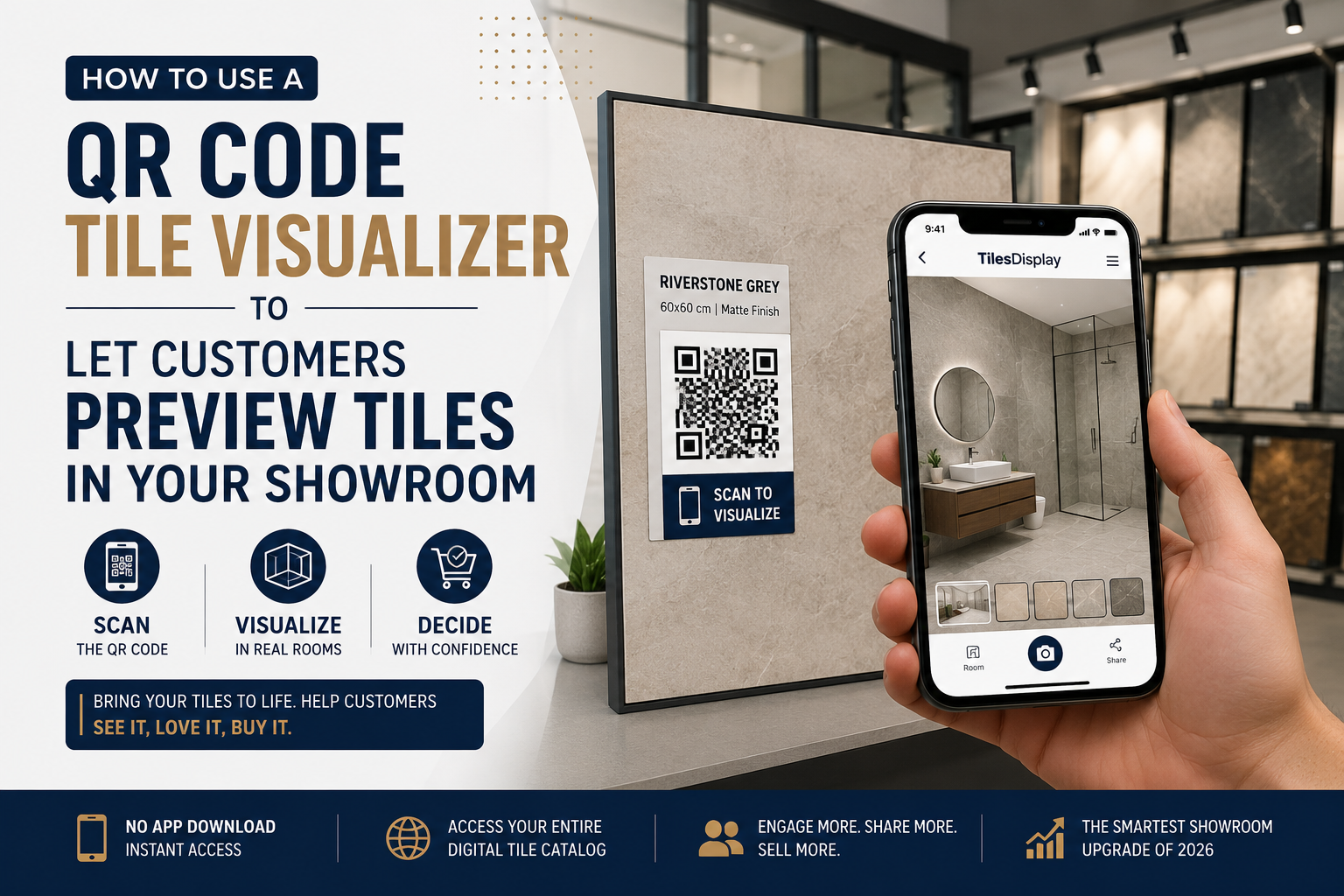
Your showroom has beautifully displayed tiles. Your customers pick them up, look at them, and still cannot quite imagine how that 10×10 cm piece will cover an entire bathroom wall. That is not a customer problem, it is an information gap. And a QR code tile visualizer closes it in seconds.
This guide explains exactly what a QR code tile visualizer is, why it is the most frictionless tile customer experience available today, and how to set one up in your showroom or at a trade exhibition, step by step. Whether you are a retailer looking to build a smart showroom or a manufacturer upgrading your trade show display, this is how the best tile businesses are using QR code showroom technology in 2026.
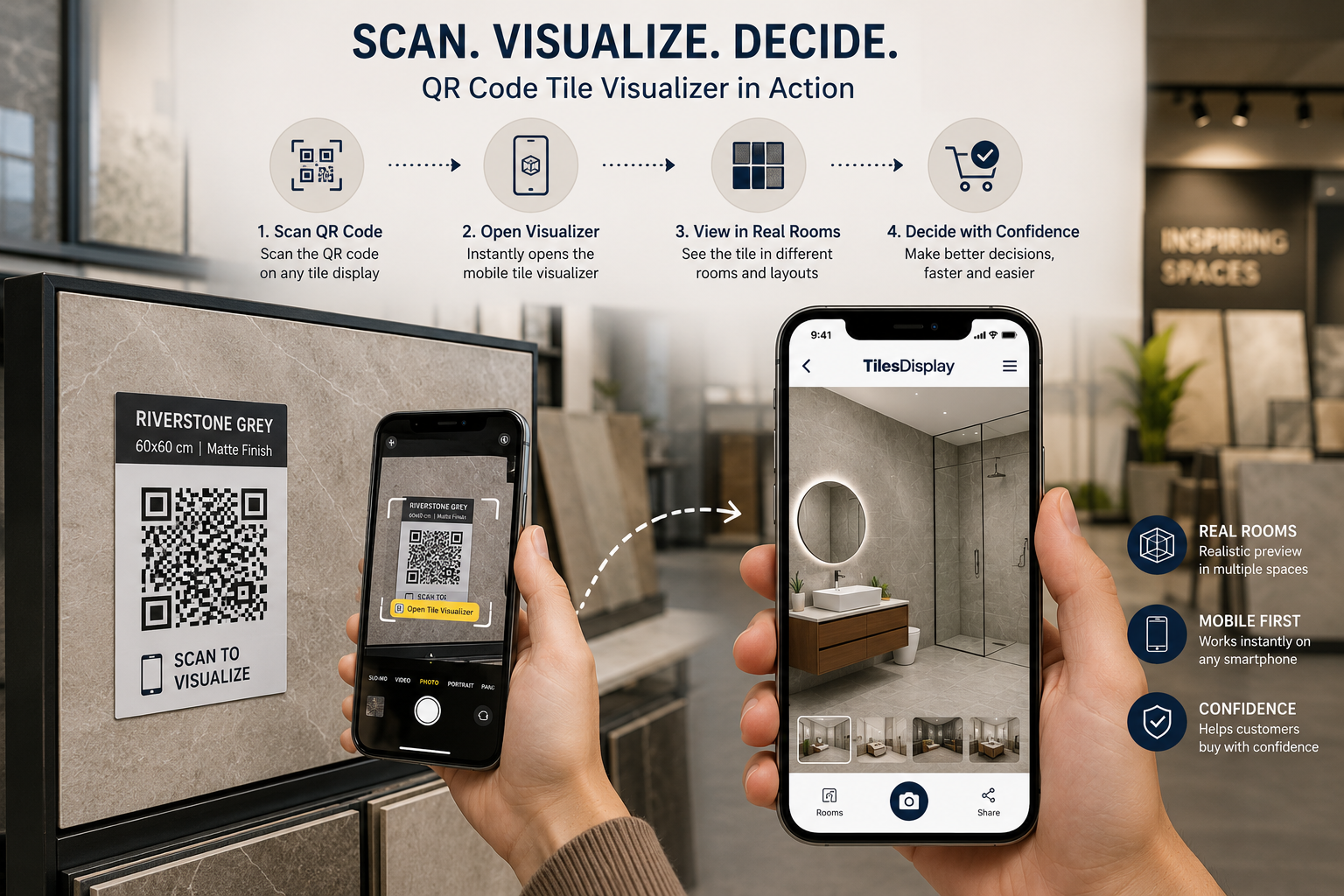
A QR code tile visualizer is a system that connects a physical tile display, a sample board, a display card, or a tile fixture, to a live digital tile catalog and mobile tile visualizer via a scannable QR code. When a customer scans the QR code with their smartphone camera, the mobile room visualizer opens on their phone, pre-loaded with that exact tile, ready to be previewed in a full room environment.
No app download is required. No search needed. No navigation through a website. The customer scans the QR code showroom marker, and within seconds they are seeing that specific tile applied to a bathroom, kitchen, living room, or any room template – on the screen they already have in their hand.
A QR code tile visualizer turns every physical tile in your showroom into a live digital product demonstration. The tile does not just sit on a display rack, it performs.
Most showroom visitors browse without deep engagement. They glance at tiles, pick up a few, and move on without a strong impression. A QR code tile visualizer changes this dynamic entirely. The moment a customer scans a code and sees a tile applied to a room that looks like their own bathroom, they are invested. They are imagining their space with that tile in it. A customer who is visualizing is a customer who is deciding, and that is exactly where you want them.
This is the core value of tile retail technology that connects the physical to the digital: it transforms passive showroom traffic into active, emotionally engaged decision-makers who are far more likely to purchase.
A physical showroom can display a finite number of tile designs. Restocking and display costs mean most retailers show only a fraction of their available range. A QR code tile visualizer changes this constraint fundamentally. Every QR code you place in the showroom is a gateway to your entire digital tile catalog: all colorways, all formats, all sizes, all materials.
A customer who likes the texture of a tile on display but wants to see it in a different finish scans the code, opens the digital tile showroom, and browses the full family. Your effective floor space becomes unlimited.
A customer who generates a tile visualization on their phone will almost always share it, with a partner via messaging, with an interior designer via email, or on social media. Every share is organic word-of-mouth promotion for your business, carrying a realistic room image of your tile that performs far better than any product photograph.
This sharing behavior is one of the most underappreciated benefits of QR code showroom technology. The visualization does not end when the customer leaves your store, it travels with them and continues working as a persuasion tool throughout their buying decision.
A homeowner browsing your retail showroom uses the mobile tile visualizer to preview tiles in their own home. An interior designer visiting your trade counter uses it to show options to their client during a video call that afternoon. A commercial buyer at an exhibition stand uses it to evaluate your tile for a hotel renovation project. The same QR code tile visualizer serves every audience, which is what makes it one of the most commercially efficient tile showroom technology investments available.
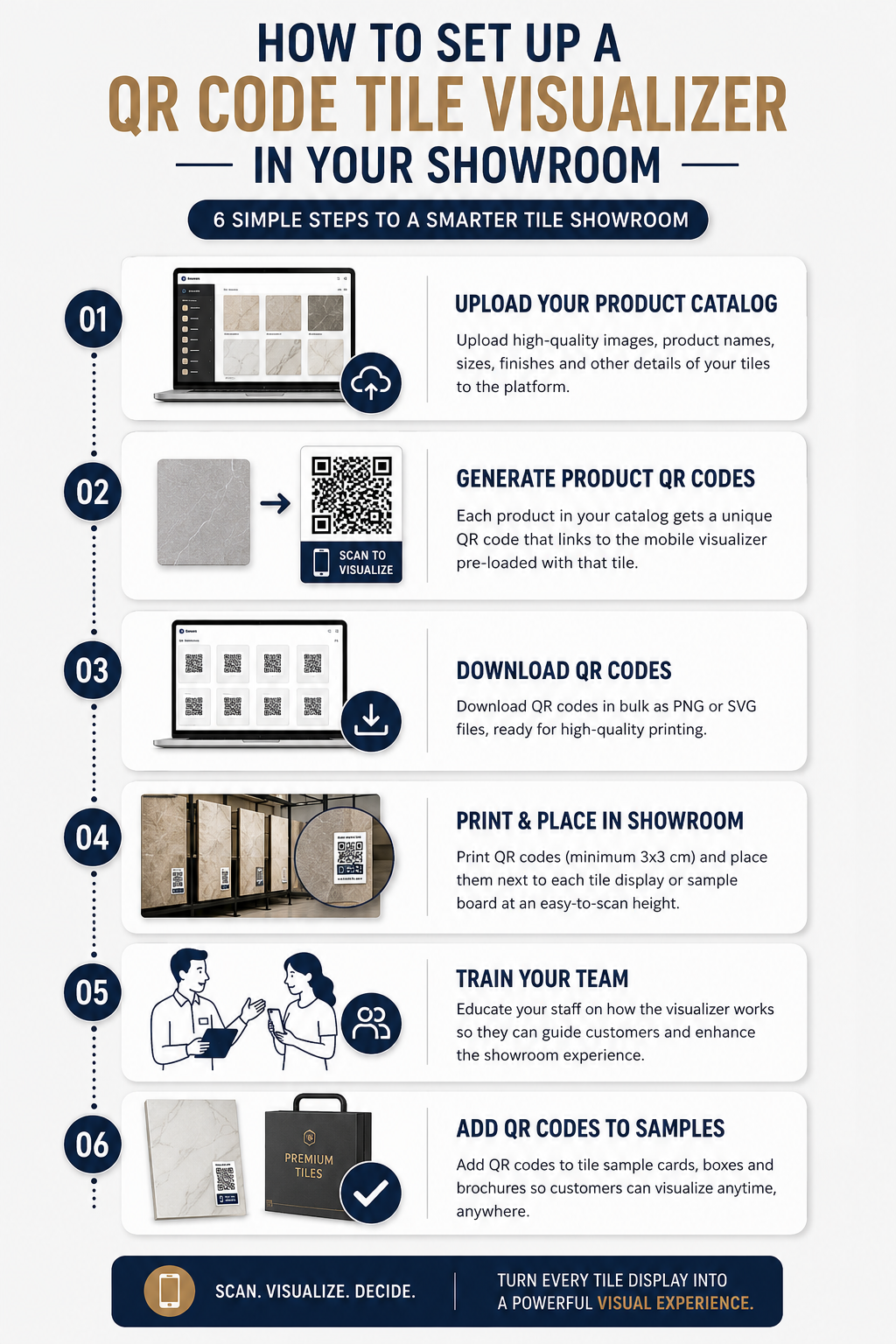
Not all tile visualizer platforms include QR code functionality. You need tile selection software that generates product-specific QR codes, each linking to a live mobile room visualizer pre-loaded with that exact product, not just a generic QR code pointing to your website homepage. TilesDisplay includes QR code generation as a core feature, linked directly to each product in your digital tile catalog.
Your tile images and product data must be in the platform before QR codes can be generated. Upload your tile images, product names, dimensions, and finish descriptions. In TilesDisplay, each product in the digital tile catalog automatically receives a unique QR code. When a customer scans the code for a specific tile, the virtual tile preview opens pre-loaded with exactly that product.
Once your catalog is live, generate QR codes from the platform dashboard. TilesDisplay allows batch generation, you can download QR codes for your entire catalog at once. Each QR code is a unique link to the live tile visualizer for that product. Download as PNG or SVG for print-quality output.
Print QR codes at a minimum of 3×3 cm for reliable scanning, 4×5 cm is better for casual one-handed scanning from a standing position. Place them strategically:
Staff who understand the QR code tile visualizer and can demonstrate it confidently are a powerful sales asset. A staff member who hands a customer a tile and says 'scan this code to see it in your bathroom' is delivering a customer visualization experience that competitors cannot match. Train staff to use the mobile tile visualizer themselves so they can demonstrate it when a customer is unsure.
Print QR codes on sample boxes, branded tissue paper, and take-home product cards. When a customer leaves your showroom with a tile sample, they also leave with a direct link to the virtual tile preview for that exact product. This keeps your brand present throughout their buying decision, which for tiles can span days or weeks.
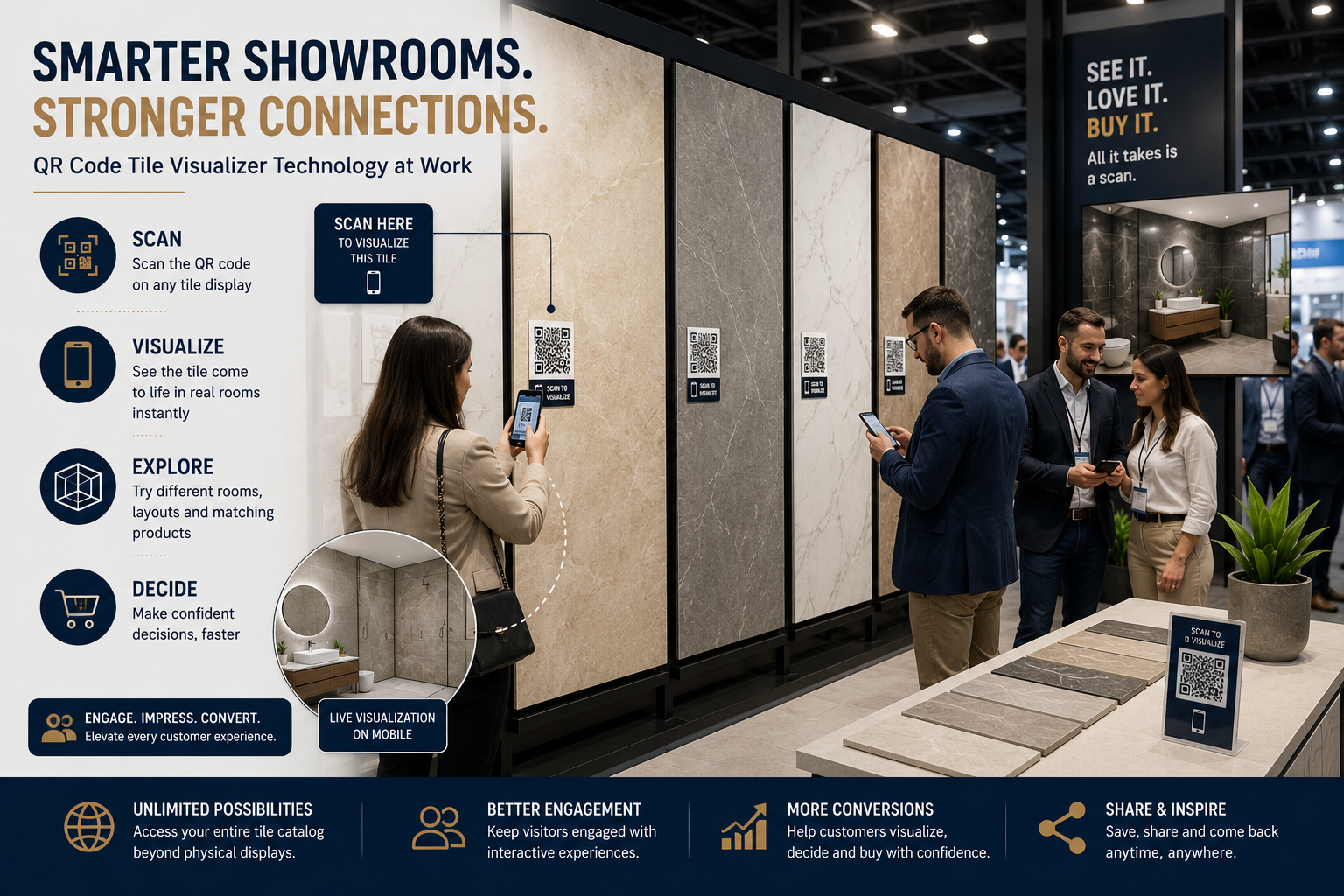
At exhibitions, Acetech, Coverings, Cersaie, and regional tile trade events, physical display space is expensive and limited. A smart showroom strategy using QR codes on your exhibition stand means a visitor can access your entire digital tile catalog from your stand, regardless of how many physical tiles you have displayed. After the event, the scan data from your QR codes tells you exactly which products generated the most interest, intelligence that directly informs your follow-up strategy.
If you operate both a physical showroom and an e-commerce website, QR codes in the showroom can be configured to link directly to the product page on your website, where the customer can check pricing, availability, and complete the purchase. This creates a seamless omnichannel flow from physical interaction to digital purchase with no friction.
Export QR code scan data from the platform to identify which tiles specific customers engaged with in your showroom. Use this data to send personalized follow-up messages, 'We noticed you were interested in the Bianco Marble Gloss 60x120, here is a link to preview it in your room', with a direct link to the mobile tile visualizer for that product. This level of personalization was previously only possible with expensive CRM integrations. QR code tile visualizer technology makes it standard.
Good tile visualization platforms provide analytics on QR code usage. The metrics to track regularly:
This data also serves as a product buying guide. Tiles with high scan rates but low conversion rates may have pricing or availability issues. Tiles with low scan rates may need better placement or more prominent QR code positioning in the showroom.
TilesDisplay QR code generator → tilesdisplay.in/generate-qr-code
TilesDisplay digital tile catalog → tilesdisplay.in/product-catalog-generator
Interactive showroom kiosk → tilesdisplay.in/interactive-kiosk
A QR code tile visualizer is a system that connects a physical tile display to a live mobile tile visualizer via a scannable QR code. When a customer scans the code, the tile visualizer opens on their smartphone pre-loaded with that specific tile, ready to be previewed in a full room environment. No app download or website navigation is required.
No. All modern smartphones can scan QR codes using the built-in camera application, no separate app is required. The mobile tile visualizer opens directly in the phone's browser, making the tile customer experience completely frictionless for every visitor.
QR codes transform static tile displays into interactive product demonstrations. Each QR code links to a live digital tile catalog and mobile room visualizer, allowing customers to see any tile in multiple room environments from the showroom floor. This is one of the most impactful single upgrades in tile retail technology, low cost, high engagement, and works immediately.
Yes. TilesDisplay provides analytics on QR code scan data, showing which products received the most scans, which room types were selected, how long customers spent in the virtual tile preview, and whether they shared the visualization. This scan data is one of the most valuable sources of product engagement intelligence available to tile retailers.
A smart showroom is a physical tile retail space equipped with digital tile showroom technology, including QR code tile visualizers on every display, touchscreen kiosks for catalog browsing, and mobile room visualizer integration. The goal is to make every physical tile in the showroom accessible as a full digital product experience, removing the limitations of physical display space.
Yes, and they are especially valuable at exhibitions. QR codes on your trade show display panels give visitors access to your entire digital tile catalog from a compact stand. After the show, scan analytics tell you exactly which products generated the most interest – making follow-up conversations significantly more targeted and effective.
A mobile tile visualizer is a tile visualization tool optimized for smartphone use. It allows customers to preview tiles in room environments directly on their phone, either via a website browser or by scanning a QR code in a showroom. TilesDisplay's mobile tile visualizer works across all modern smartphone operating systems and browsers without an app download.
A QR code tile visualizer is one of the simplest and most commercially powerful upgrades available to any tile showroom or exhibition operation in 2026. It connects every physical tile in your display to a live, interactive digital tile catalog that customers can explore on their phone in seconds. It extends your floor space infinitely, turns passive browsers into invested decision-makers, and creates a tile customer experience that competitors without this tile retail technology simply cannot match.
The setup is straightforward. The data is valuable. The customer impact is immediate. And as smart showroom technology becomes the expectation rather than the differentiator, the window to build an advantage by being early is narrowing.
How many physical tiles do you currently have on display in your showroom, and how many of them are telling their full story to the customers who pick them up?
Try TilesDisplay QR code tile visualizer free → tilesdisplay.in/signup
Excerpt: A QR code tile visualizer connects every physical tile in your showroom to a live mobile tile visualizer, letting customers scan, preview, and share tile designs in real room environments from their smartphone. This guide explains how to set up QR code showroom technology step by step and use it to build a smart showroom that sells more tiles.
