


















Elevate Your Interiors
with Trendy Tiles Display
Tiles That Speak the Language of Design.
13th Aug, 2026
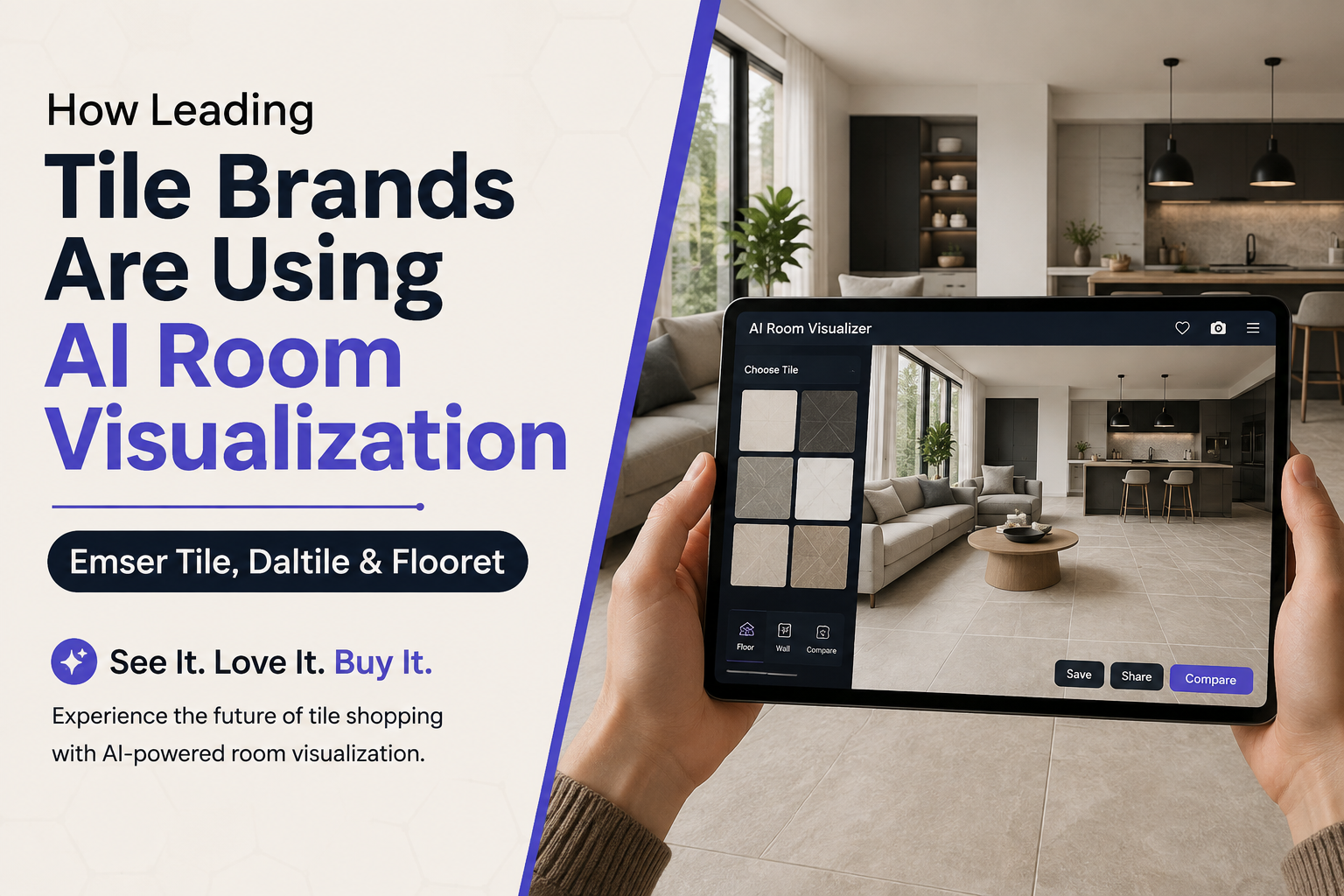
Have you ever stood in a tile showroom, holding one tiny 6x6 inch sample, trying to picture how it would look across your entire kitchen floor? If your answer is "yes, and I still got it wrong," you're not alone. That exact moment of doubt is why an AI room visualizer has quietly become the most important tool in the tile and flooring industry.
Big names like Daltile, Emser Tile, and Flooret have all rolled out their own versions of AI room visualization technology. Not because it's trendy, but because customers were tired of guessing. In this article,
we're going to break down exactly how these three leading tile brands are using AI to help people shop smarter, and what that means for you as a homeowner, designer, or business owner looking for the right room visualizer for your own needs.
We'll also show you how a platform like Tilesdisplay (tilesdisplay.in) brings this same kind of AI room design experience to everyday shoppers who just want to see the tile in their room before they commit a single rupee.
Think about it this way: would you buy a pair of shoes without knowing your size, just hoping they'd fit? Probably not. Yet for decades, that's exactly how tile shopping worked. You picked a color from a tiny chip, crossed your fingers, and hoped the finished room would look like the picture in your head. AI room visualization exists to remove that guesswork completely, and the fact that three very different tile companies have each built their own version of it tells you how seriously the industry takes this shift.
This guide is written from a research-first, practical perspective. We looked directly at how Daltile, Emser Tile, and Flooret describe and demonstrate their own tools, compared the features side by side, and pulled out the lessons that actually matter for someone shopping for tile today. No fluff, no vague marketing language, just a clear look at what's real, what works, and how you can use the same technology for your own home.
Let's get into it.
Think of an AI room visualizer as a digital mirror for your home. You upload a photo of your room, pick a tile or flooring design, and the tool instantly shows you what that space would look like with the new surface applied. No guesswork. No imagination required.
This is different from the old-school "drag and drop" catalog tools that only showed generic, pre-set room scenes. Modern AI room visualization tools use computer vision and machine learning to:
In short, it's not just a "visualizer" anymore. It's becoming a full AI interior design tool that helps you make confident decisions before you ever place an order.
Here's an easy way to picture it. Imagine handing a skilled interior designer a photo of your kitchen and asking, "What would this look like with a different floor?" A good designer would study the light, the angles, the furniture, and then sketch out a realistic version for you. That used to take hours, cost money, and require booking an appointment. An AI room visualizer does the same job in seconds, for free, from your phone. That's the entire promise of this technology, and it's why homeowners, contractors, and even architects have started treating it as a standard step in the planning process rather than a fun extra.
It also helps to understand what separates a genuine AI room visualization tool from an old-fashioned "photo overlay" gimmick:
That difference in realism is exactly why brands like Daltile, Emser, and Flooret rebuilt their tools using AI rather than sticking with the older static versions.
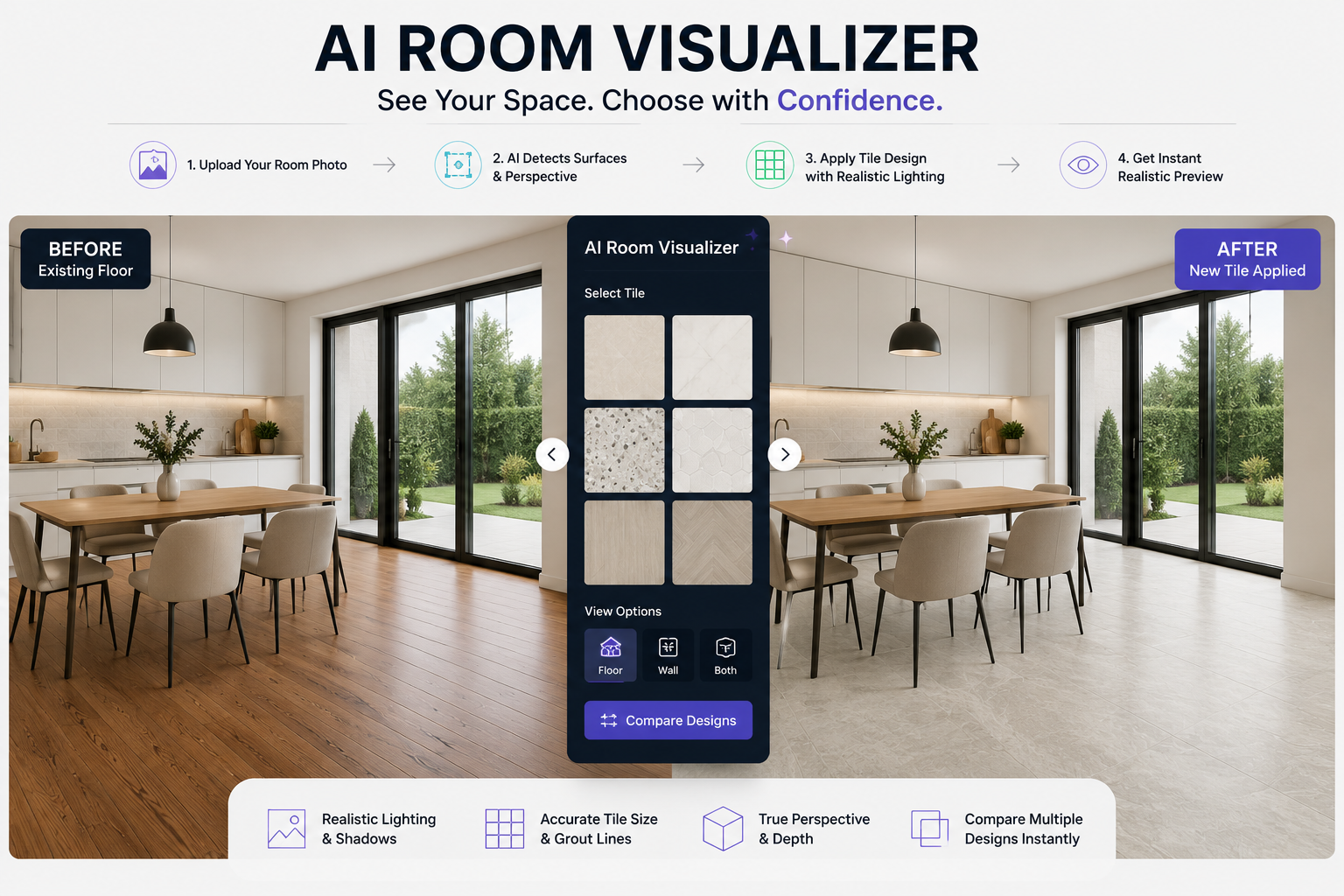
You don't need to be a tech expert to understand this. Here's the simple version:
That's the entire magic behind a good AI room visualizer. It sounds complex on the backend, but for the person using it, it should feel as easy as taking a selfie.
The Problem: Why Traditional Tile Shopping Fails Buyers
Let's be honest about something first. Tile shopping has always had a trust problem. You walk into a store, you see a beautiful display, and then you get home and realize the tile in your actual bathroom looks nothing like what you imagined.
A single tile sample can't tell you how a pattern repeats across 200 square feet. It can't show you how morning light hits your east-facing kitchen versus a north-facing bathroom. This mismatch between "showroom expectation" and "real-world result" has been the single biggest pain point in the flooring and tile industry for decades.
Here's a number worth sitting with: industry surveys on home renovation consistently show that a large share of homeowners regret at least one material decision they made during a renovation, often because they couldn't accurately picture the final result. That regret leads to returns, redo costs, and wasted time. For brands, it also means lost trust and lower repeat business.
This is exactly the gap that an AI room visualizer was built to close.
Numbers tell this story better than opinions do. Across the home improvement and retail space, the pattern is consistent: shoppers who can preview a product in their own environment convert at a noticeably higher rate than those who only see catalog photos.
A few data points worth knowing:
This is also why AI room visualization has become a trust-building tool, not just a sales one. When a brand lets you see the real result before you buy, it signals confidence in its own product. That's a subtle but powerful form of transparency that builds long-term customer trust, which is exactly the kind of experience-first, honest approach that both shoppers and search engines increasingly reward.
A few years ago, "room visualizer" tools were clunky. You'd pick from three generic stock rooms and hope one looked kind of like yours. Today, thanks to advances in AI, room visualization software has become genuinely useful, fast, and accurate.
Here's the honest reason: online shopping behavior changed. More people research and choose tile and flooring online before ever visiting a physical store. If a brand's website couldn't show a realistic preview, customers simply clicked away to a competitor that could.
That pressure pushed major players to invest heavily in AI interior design technology. And three brands in particular, Daltile, Emser Tile, and Flooret, offer a great case study in how different companies approach the same problem with slightly different tools.
Daltile has gone further than most tile brands by building what it calls Stylizer AI, an AI room visualizer positioned as a full personal room planner rather than just a preview tool.
Here's what makes it stand out:
Daltile also offers a separate Virtual House tool, a 360-degree walkthrough experience that lets shoppers explore a fully tiled model home room by room. Together, these tools show how a legacy tile manufacturer has rebuilt its entire online design experience around AI-first thinking.
What this tells us: Daltile isn't just using AI for a single feature. It's using AI room design as the foundation of how customers discover and choose products in the first place.
Think about how many decisions go into a single bathroom remodel: floor tile, wall tile, countertop material, and how they all coordinate together. Traditionally, a homeowner would need to hire a designer just to make sure those choices didn't clash. By building style-based pairing directly into its AI room visualizer, Daltile essentially gives every visitor free access to a mini design consultation. You're not just picking a tile in isolation anymore, you're seeing a coordinated look, which removes one of the biggest sources of decision paralysis in home renovation.
There's also a psychological benefit worth mentioning here. When people feel like they're "collaborating" with a tool rather than just browsing a catalog, they tend to spend more time exploring options and feel more ownership over the final choice. That's the quiet genius behind the "regenerate" button in Stylizer AI. It turns a single decision into a playful, low-pressure exploration process, which is exactly what most people want when they're nervous about spending money on a renovation.
Emser Tile has actually been experimenting with digital visualization tools since 2013, when it first launched its Envision Room and Backsplash Visualizer. That's early, especially for the tile industry. Over time, this evolved into what's now known as the Emser Tile Visualizer.
Here's what the current version offers:
Emser's approach shows something important: an AI room visualizer doesn't have to be flashy to be effective. Sometimes the winning strategy is steady, incremental improvement over more than a decade, refining the same core idea until it becomes second nature for shoppers.
There's a lesson here for anyone evaluating room visualization software, whether you're a business owner or a homeowner comparing tools. Longevity matters. A tool that's been refined since 2013 has likely absorbed thousands of rounds of customer feedback, bug fixes, and usability improvements that a brand-new tool simply hasn't had time to work through yet. Emser's steady evolution, from the original Envision Room and Backsplash Visualizer to today's more advanced, cross-device Visualizer, shows how consistent investment in AI interior design technology compounds over time. The tool didn't need to reinvent itself overnight. It just needed to keep getting a little better, year after year, until it became one of the more dependable options in the industry.
It's also worth noting how Emser blends its visualizer with its "My Memo" style project-saving feature. This lets customers build out a full room concept over multiple visits, rather than needing to make a final decision in one sitting. That kind of flexibility matters, because most people don't renovate a room in a single afternoon. They come back, compare, second-guess themselves, and come back again. A good AI room visualization tool should support that natural, sometimes slow decision-making process instead of rushing it.
Flooret takes a slightly different approach by partnering with Roomvo, a visualization technology provider, to power its Room Studio tool. This is a smart move for a growing flooring brand that wants best-in-class room visualization software without building everything from scratch in-house.
Key features of Flooret's tool include:
That lighting simulation feature is a big deal. Lighting is one of the top reasons a flooring or tile color looks completely different at home compared to the showroom. By solving for that specifically, Flooret's AI room visualization tool addresses one of the most common sources of buyer's remorse.
Here's why this matters more than it might seem at first glance. Two rooms with identical flooring can look completely different depending on whether the space gets warm afternoon sun or cool north-facing light. A flooring tone that reads as "warm honey oak" under daylight bulbs can look almost gray under cooler LED lighting. Most room visualizer tools completely ignore this variable, showing you one static, idealized lighting condition regardless of your actual home. Flooret's decision to build lighting simulation directly into its Room Studio tool, through its Roomvo partnership, solves a problem that's honestly more important than most people realize until they've been burned by it once.
This also highlights a smart strategic choice: rather than building every piece of visualization technology in-house, Flooret partnered with a specialist. For a growing flooring brand, this meant getting access to a more mature, feature-rich AI room visualizer faster than building one from scratch would have allowed. It's a good reminder that you don't always need to reinvent the wheel to deliver a great customer experience, sometimes the smartest move is choosing the right technology partner.
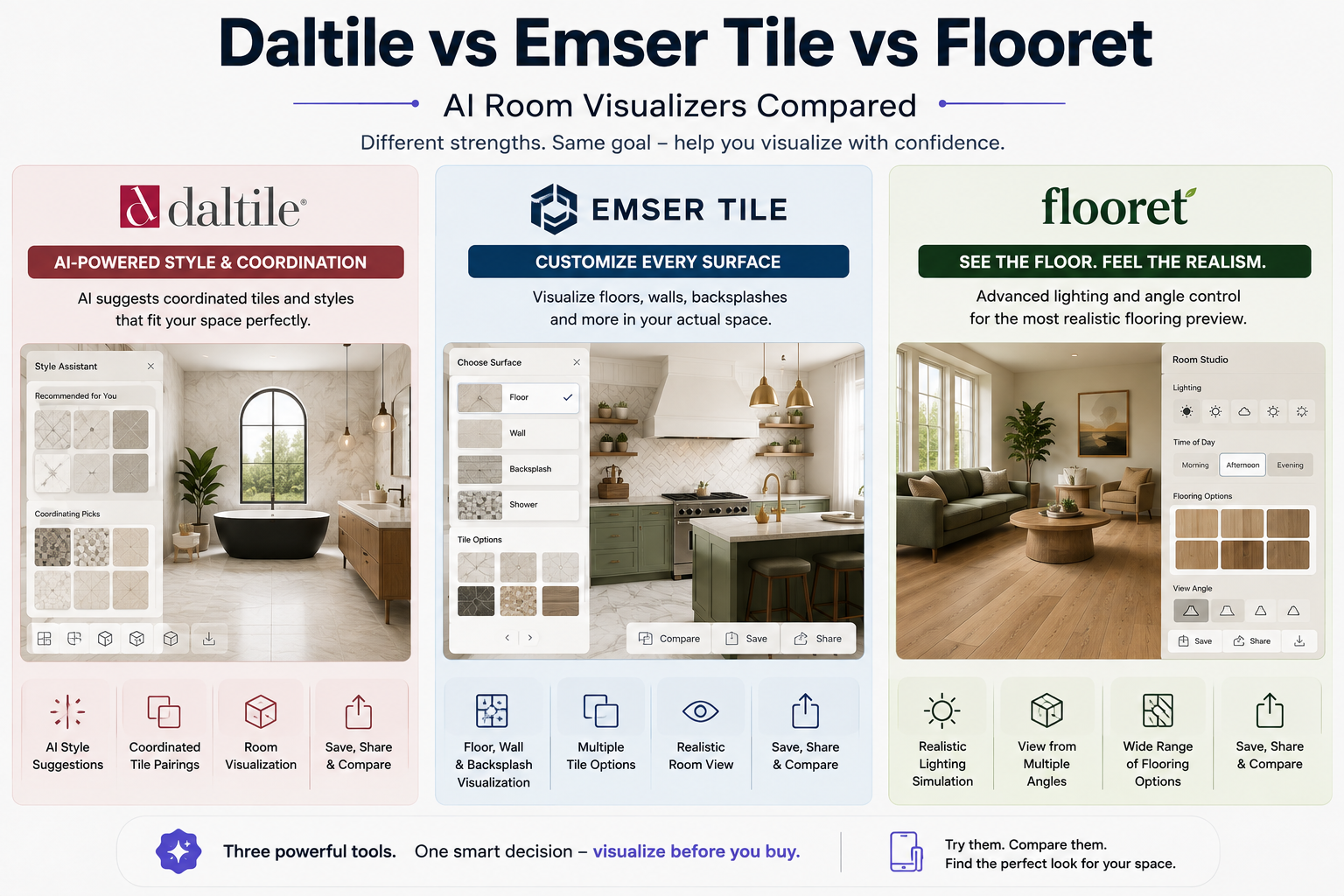
Here's a quick breakdown so you can see how these three approaches stack up:
|
Feature |
Daltile (Stylizer AI) |
Emser Tile Visualizer |
Flooret (Room Studio) |
|
Upload your own room photo |
Yes |
Yes |
Yes |
|
Pre-loaded room scenes |
Yes |
Yes |
Yes |
|
Style-based AI suggestions |
Yes |
No |
No |
|
Multi-surface editing (wall + floor + backsplash) |
Yes |
Yes |
Limited |
|
Rotation control |
Limited |
Limited |
Yes |
|
Lighting/time-of-day simulation |
No |
No |
Yes |
|
Side-by-side comparison slider |
No |
No |
Yes |
|
Third-party powered |
No (in-house) |
Partly (Roomvo option) |
Yes (Roomvo) |
What's the takeaway here? There's no single "best" way to build a room visualizer. Daltile leans into AI-generated style pairing. Emser focuses on multi-surface flexibility. Flooret leans on lighting realism through its Roomvo partnership. All three are solving the same core problem from different angles, and all three prove that AI room visualization is now considered essential, not optional, for a modern tile or flooring brand.
Let's make this less abstract. Picture a homeowner named Priya, planning to renovate her kitchen. She has two tile options in mind: a warm beige textured porcelain and a cooler gray marble-look tile. Under the old system, she'd take home two small samples, prop them against her cabinets, squint at them under her kitchen light, and still feel unsure.
Now picture the same decision using an AI room visualizer. Priya uploads a photo of her actual kitchen. She applies the beige tile first, and instantly sees how it plays against her existing cabinet color. She switches to the gray marble-look option and notices, almost immediately, that it clashes with her countertop in a way she hadn't expected. She didn't need to imagine anything. She saw it.
That single moment, catching a clash before ordering, is worth more than any product description or influencer photo. It's the difference between a renovation she loves and one she quietly regrets every time she walks into her kitchen. This is the real value of AI room design technology: it doesn't just make shopping more convenient, it protects people from expensive, hard-to-reverse mistakes.
Multiply Priya's story by thousands of homeowners making similar decisions every day, across kitchens, bathrooms, living rooms, and even commercial spaces, and you start to understand why Daltile, Emser, Flooret, and platforms like Tilesdisplay have all invested so heavily in getting this experience right.
If you're a tile retailer, distributor, or interior designer, this isn't just a nice-to-have feature for your customers. It's becoming a business necessity.
Here's why this matters for your bottom line:
This is why room visualization software has shifted from being a marketing add-on to being treated as core sales infrastructure for tile and flooring companies of every size.
If you run a showroom, a distribution business, or an interior design practice, here's a practical way to think about it. Every hour your sales team spends walking a customer through fifteen sample boards is an hour they can't spend closing another deal. An AI interior design tool doesn't replace that human expertise, but it does the heavy lifting of narrowing down options before your team even gets involved. By the time a customer reaches out or walks into your store, they've often already used a room visualizer to shortlist two or three favorites. That means your team's conversations become faster, more focused, and far more likely to end in a sale.
For smaller regional tile retailers who can't afford to build a custom AI system the way a national brand like Daltile can, this is exactly where a ready-made platform becomes valuable. Businesses can integrate existing AI room visualization technology into their own websites or in-store kiosks without needing an in-house engineering team, leveling the playing field between large manufacturers and independent retailers.
Let's zoom back out to the person actually shopping for tiles. Why should you care about any of this?
Isn't it strange that we used to make five-figure renovation decisions based on a single 4-inch swatch? That era is genuinely ending.
There's also an emotional benefit that's easy to overlook. Renovating a home is stressful. There are budgets to manage, timelines to hit, and a hundred small decisions piling up at once. Being able to open an AI home design tool on your phone and instantly settle one of those decisions, "yes, that gray tile works with my cabinets," removes a small but meaningful amount of stress from the process. Multiply that across dozens of decisions in a full renovation, and the cumulative effect on your peace of mind is genuinely significant. Confidence isn't just a nice feeling here, it directly translates into fewer arguments with contractors, fewer last-minute order changes, and a renovation that stays closer to both your budget and your timeline.
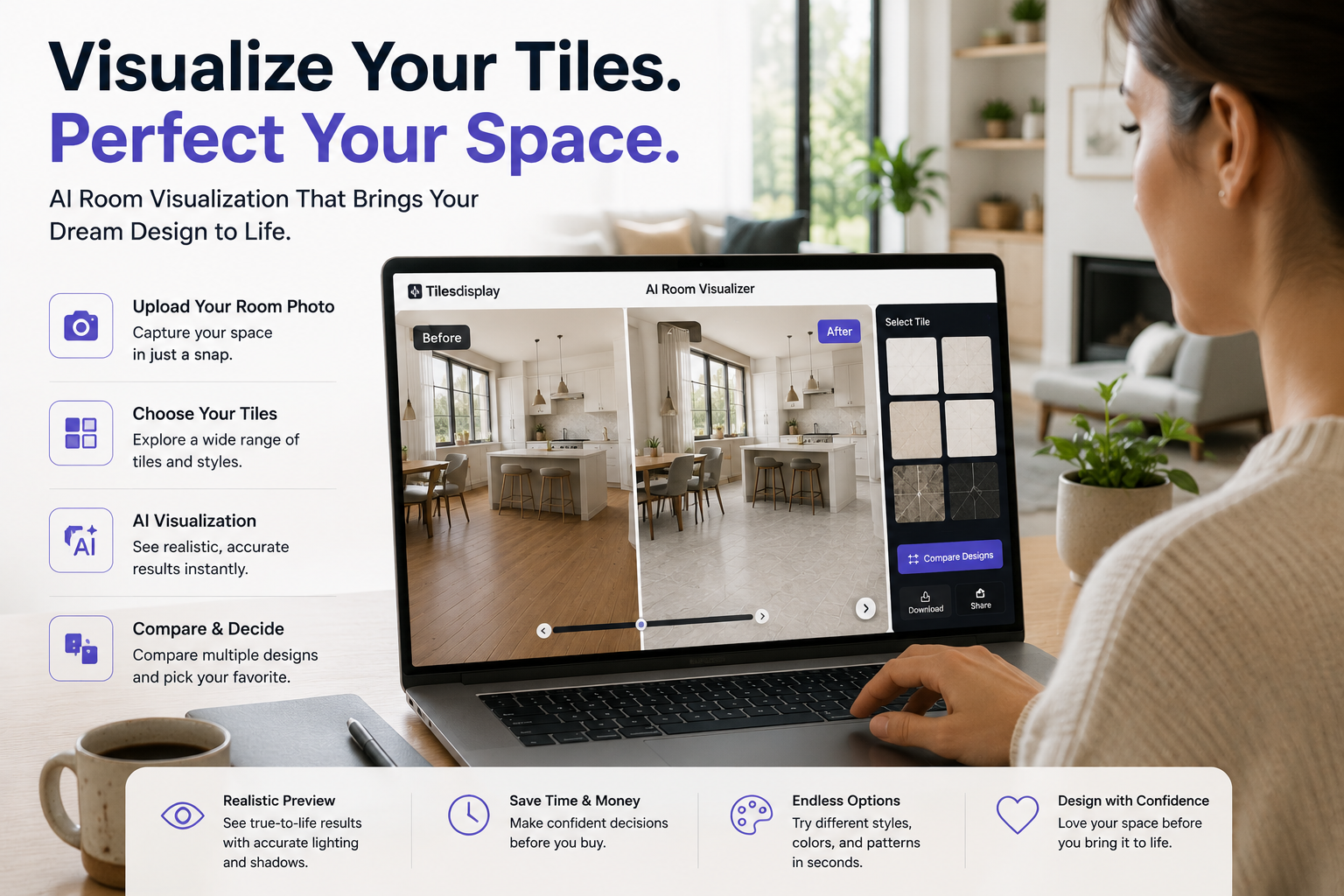
This is where Tilesdisplay comes in. While global brands like Daltile, Emser, and Flooret have built their own in-house or partnered visualization tools, a lot of homeowners and businesses still don't have easy access to this kind of technology for the wider range of tile options available in local and regional markets.
That's exactly the gap Tilesdisplay is built to close.
At tilesdisplay.in, the goal is simple: give every homeowner, contractor, and designer access to the same quality of AI room design experience that global tile brands offer, without needing to be locked into one specific manufacturer's catalog.
Here's what that looks like in practice:
Whether you're a homeowner planning your first renovation or a business trying to help customers visualize products faster, Tilesdisplay's approach to AI room visualization is built to make that decision easier, not more overwhelming.
One thing that sets a catalog-agnostic tool like Tilesdisplay apart from a single-brand visualizer is freedom of comparison. When you use Daltile's Stylizer AI, you're naturally limited to Daltile's product range. Same with Emser and Flooret. That makes sense for those brands, but it doesn't always match how real people shop. Most homeowners don't decide "I only want Daltile products" before they even start browsing. They want to compare a marble-look tile from one supplier against a concrete-look tile from another, all within the same visual context. That's the core idea behind Tilesdisplay's AI room visualizer: helping you compare broadly first, then narrow down with confidence.
For businesses, Tilesdisplay also functions as a practical AI interior design tool that can be embedded into a retailer's own website or used directly by sales staff during in-store consultations. Instead of asking a customer to imagine the finished look, a salesperson can pull out a tablet, upload a photo of the customer's room right there in the store, and generate a preview on the spot. That kind of in-the-moment demonstration tends to build trust far faster than any brochure or verbal description ever could.
Ready to actually try one of these tools yourself? Here's a simple checklist to follow, whether you're using Tilesdisplay, Daltile's Stylizer AI, Emser's Visualizer, or Flooret's Room Studio.
Before you start:
Take a well-lit photo of your room during the daytime
Shoot from a corner angle so the AI can capture depth and perspective
Clear obvious clutter from the floor or walls you're changing
Make sure the surface you want to change (floor, wall, backsplash) is clearly visible
While using the tool:
Try at least 3-5 different tile options before deciding
Use the comparison feature (if available) to view two options side by side
Check how the design looks under different lighting settings, if offered
Zoom in on grout lines and pattern repeats to check for realism
Before you finalize:
Save or screenshot your top two or three choices
Order a small physical sample of your final pick to confirm color accuracy
Cross-check the tile size and finish (matte, glossy, textured) against your room's function
Following this checklist turns a fun little digital experiment into an actual decision-making tool that saves you money.
If you've used a room visualizer before and felt like the results looked "off," it's usually not the tool's fault. It's almost always about the input photo. Here are some advanced tips to get sharper, more realistic results.
One more pro tip: if you're comparing tile for an open-concept space, visualize each connected area (kitchen, dining, living room) separately, then check how the transitions look together. This avoids one of the most common regrets homeowners report, awkward transition strips between mismatched tile choices.
A few more advanced tricks that experienced designers and contractors tend to rely on:
These small habits are what separate a casual five-minute session with an AI room visualizer from a genuinely useful planning tool that protects your budget and your sanity.
Even a great AI room visualizer can lead you astray if you're not using it correctly. Watch out for these common mistakes.
Avoiding these mistakes is the difference between using an AI interior design tool casually and using it strategically.
Here's one more mistake worth calling out specifically because it's so common: comparing tile in isolation from your budget. It's easy to fall in love with a premium marble-look porcelain inside a visualizer, only to discover later that it's priced well outside your renovation budget. Before you start exploring options in any room visualizer, it helps to set a rough price range first, then filter your exploration within that range. This keeps the excitement of seeing beautiful previews from turning into disappointment when it's time to actually place an order.
Where is all of this heading? A few trends are becoming clear across the industry:
The bigger picture here is simple. AI room visualization isn't a passing trend. It's becoming the standard way people shop for tile, the same way product reviews and size charts became standard for online clothing shopping.
It's worth pausing on that comparison for a second. Fifteen years ago, buying clothes online felt risky because you couldn't try anything on. Detailed size charts, fit videos, and customer photos slowly solved that trust gap, and now online clothing shopping is completely normal. Tile and flooring are going through the exact same trust-building journey right now, just a bit later, and AI room visualizer technology is playing the same role that size charts once did. It's not replacing the in-person experience entirely, but it's removing enough uncertainty that most of the decision-making can now happen comfortably online, before a customer ever needs to step into a physical showroom.
Daltile, Emser Tile, and Flooret each prove the same point in their own way: guessing how a tile will look in your home is no longer necessary. Whether it's Daltile's style-based AI suggestions, Emser's decade-plus of visualizer refinement, or Flooret's lighting-accurate Room Studio, the message from the industry is clear. A good AI room visualizer isn't a gimmick anymore. It's how confident buying decisions get made.
And you don't need to be shopping from a specific global brand to get that same experience. At Tilesdisplay, you can upload your own room, try realistic tile and design options, and make your next renovation decision with actual confidence instead of guesswork.
Ready to see your space before you commit? Visit tilesdisplay.in and try the AI room visualizer for yourself, completely free, before you order a single tile.
At the end of the day, this comes down to a simple shift in how home projects get planned. AI home design tools have moved from being a rare, expensive service reserved for big-budget renovations to something anyone can access in a few taps. You no longer need to hire a professional just to know whether a tile choice will work in your space. You can find out for yourself, in seconds, and walk into any showroom or place any order with real confidence instead of a hopeful guess.
An AI room visualizer is a tool that lets you upload a photo of your room and instantly preview how a tile, flooring, or design option would look in that exact space. It uses computer vision to map your room's shape, lighting, and perspective, then applies the chosen material so it looks like it genuinely belongs there, complete with realistic shadows and scale, rather than a flat texture pasted over your photo.
They're generally very accurate for shape, pattern, and layout, but color can shift slightly based on your screen's calibration and your room's lighting conditions at the time you took the photo. This is true across every tool we looked at, including Daltile's Stylizer AI, Emser's Visualizer, and Flooret's Room Studio. It's always smart to confirm your final choice with a physical sample before ordering in bulk, treating the AI room visualization result as a strong guide rather than a guaranteed final match.
Not at all. Most AI interior design tools, including Tilesdisplay's, are built specifically for beginners with zero design background. You simply upload a photo, browse tile or flooring options, and compare results side by side. The tool handles the technical work of scaling, lighting, and perspective for you, so you can focus purely on which look you like best.
Daltile, Emser Tile, and Flooret each offer strong, but different, tools. Daltile's Stylizer AI focuses on style-based AI suggestions and coordinated pairings, Emser's Visualizer supports flexible multi-surface editing across walls, floors, and backsplashes, and Flooret's Room Studio leads in lighting realism with its time-of-day simulation. If you want an AI room design experience that isn't limited to a single manufacturer's catalog, a catalog-agnostic tool like Tilesdisplay offers a similar experience with far more product variety to compare.
Yes. Tilesdisplay's room visualizer at tilesdisplay.in is designed to be accessible to homeowners, designers, and businesses without upfront cost, so you can explore a wide range of tile options confidently before making a purchase decision, order a sample, or reach out for a quote.